Glove


A fast multi-modal journey planner built in Rust with a React frontend.
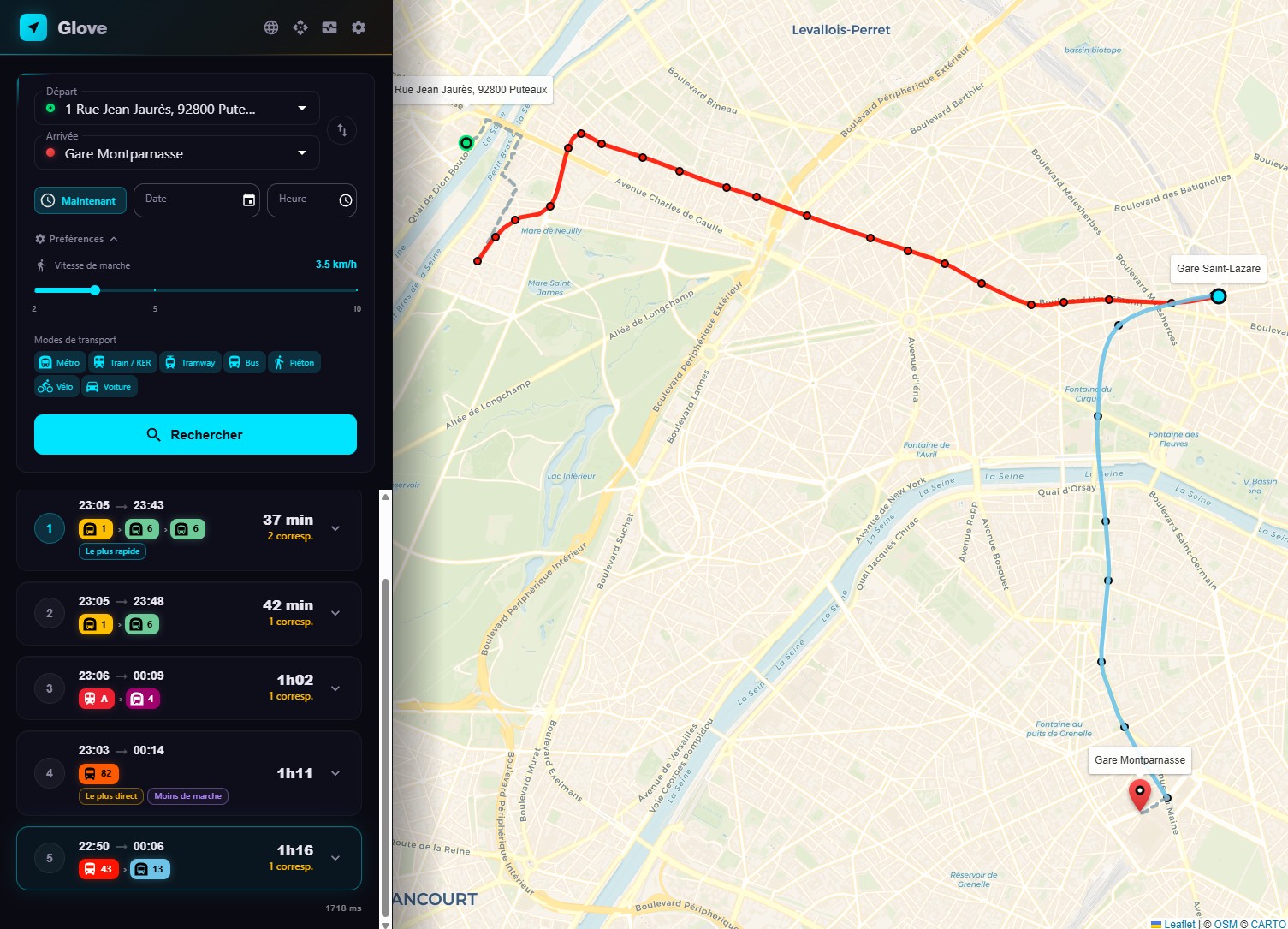
Glove loads GTFS data into memory, builds a RAPTOR index, and exposes a REST API for journey planning. It supports public transit, walking, cycling, and driving via Valhalla integration.
The React portal provides an interactive map-based interface with autocomplete, route visualization, and multilingual support (FR/EN).
Get up and running in 3 commands:
bin/download.sh all      # Download data
bin/valhalla.sh          # Start Valhalla (optional)
bin/start.sh             # Start the server
Then open http://localhost:8080
Key Features
Routing
- RAPTOR algorithm for optimal public transit journey computation
- Multi-modal: public transit, walking, cycling (3 profiles), driving
- Diverse alternatives with progressive pattern exclusion
- Journey tags: fastest, least transfers, least walking
- Elevation-colored bike routes (green = descent, red = climb)
- Turn-by-turn directions for walk, bike, and car routes
Data & Search
- Fuzzy autocomplete with French diacritics normalization
- BAN integration for French address geocoding
- Hot reload via API without service interruption
Frontend
- Interactive Leaflet map with route polylines and stop markers
- Mode tabs: Transit, Walk, Bike, Car
- Dark theme with CARTO basemap and glassmorphism UI
- Metrics panel with live CPU, memory, and request stats
Developer Experience
- REST API documented with OpenAPI
- OpenAPI documentation auto-generated
- Prometheus metrics endpoint
- Benchmark tool for load testing
- Dev mode with cargo-watch + Vite HMR
Installation
Prerequisites
Download Data
Glove needs GTFS transit data to operate. The download script reads config.yaml for data URLs.
# Download everything (GTFS + OSM + BAN addresses)
bin/download.sh all

# Or download individually
bin/download.sh gtfs     # GTFS transit schedules
bin/download.sh osm      # OpenStreetMap data (for Valhalla)
bin/download.sh ban      # BAN French addresses (for autocomplete)
By default, this downloads data for Ile-de-France (Paris region). You can change the data URLs in config.yaml to use GTFS feeds from other regions.
Start Valhalla (Optional)
Valhalla provides walking, cycling, and driving directions. Without it, only public transit routing is available.
bin/valhalla.sh # Pulls Docker image, builds tiles, starts on port 8002
This creates a Docker container named valhalla that builds routing tiles from the downloaded OSM data.
Run
Production Mode
Build and run are separated so restarts are instant:
bin/build.sh    # Build the release backend binary + portal SPA (run after code changes)
bin/start.sh    # Run only — auto-runs build.sh on the first launch if artifacts are missing
start.sh launches two separate processes: the Actix API on port 8080 and the frontend (vite preview) on port 3000. The frontend proxies /api requests to the backend, so you access the app at http://localhost:3000.
vite preview is fine for local/self-hosted use, but it is not a hardened production web server. For real production, use the Docker setup (nginx-served portal) behind a TLS reverse proxy.
Development Mode
bin/start.sh --dev
This starts:
- Backend:
cargo-watchfor automatic recompilation on Rust file changes - Frontend: Vite dev server with HMR on port 3000
Manual Start
# Terminal 1 — Backend
cargo run --release

# Terminal 2 — Frontend
cd portal && npm install && npm run dev
Access
| Service | URL |
|---|---|
| Portal (production & dev) | http://localhost:3000 |
| API | http://localhost:8080/api |
| OpenAPI spec | http://localhost:8080/api-docs/openapi.json |
Configuration
Glove is configured via config.yaml at the repository root. All settings have sensible defaults.
Server
server:
  bind: "0.0.0.0"
  port: 8080
  workers: 1                    # 0 = auto (one per logical CPU)
  log_level: "info"             # trace, debug, info, warn, error
  shutdown_timeout: 30          # seconds — graceful shutdown for in-flight requests
  api_key: ""                   # Required for POST /api/gtfs/reload. Empty = endpoint disabled
  cors_origins: []              # Allowed origins. ["*"] = permissive (not for production)
  rate_limit: 20                # Max requests/sec per IP. 0 = disabled
| Setting | Description | Default |
|---|---|---|
bind | Network interface to listen on | 0.0.0.0 |
port | HTTP port | 8080 |
workers | Actix worker threads. 0 = one per CPU core | 1 |
log_level | Minimum log level | info |
shutdown_timeout | Seconds to wait for in-flight requests on shutdown | 30 |
api_key | API key for the reload endpoint. Empty disables the endpoint | "" |
cors_origins | List of allowed CORS origins. ["*"] allows all | [] |
rate_limit | Maximum requests per second per IP address | 20 |
Data Sources
data:
  dir: "data"
  gtfs_url: "https://data.iledefrance-mobilites.fr/..."
  osm_url: "https://download.geofabrik.de/europe/france/ile-de-france-latest.osm.pbf"
  ban_url: "https://adresse.data.gouv.fr/data/ban/adresses/latest/csv"
  departments: [75, 77, 78, 91, 92, 93, 94, 95]
| Setting | Description |
|---|---|
dir | Base data directory. Sub-directories gtfs/, osm/, raptor/, ban/ are created automatically |
gtfs_url | URL to download the GTFS zip archive |
osm_url | URL to download the OpenStreetMap PBF file (for Valhalla) |
ban_url | Base URL for BAN address CSV files |
departments | French department codes to download BAN data for |
Routing
routing:
  max_journeys: 5
  max_transfers: 5
  default_transfer_time: 120    # seconds
  max_duration: 10800           # 3 hours in seconds
  max_nearest_stop_distance: 1500  # meters (~20 min walk at 5 km/h)
  diverse_lines: false          # one line per alternative (line-level diversity)
  prefer_rail: false            # rail found first, bus only fills remaining slots
  maneuvers: false              # include turn-by-turn directions (server-controlled)
| Setting | Description | Default |
|---|---|---|
max_journeys | Maximum number of alternative journeys to return | 5 |
max_transfers | Maximum number of transfers in a journey | 5 |
default_transfer_time | Default walking time between stops (seconds) | 120 |
max_duration | Maximum total journey duration (seconds) | 10800 (3h) |
max_nearest_stop_distance | Maximum distance to nearest stops (meters) | 1500 |
diverse_lines | Force each alternative to depart on a different line (excludes the whole head line between iterations, not just the used pattern). Surfaces slower-but-distinct lines instead of variants of the same fast corridor. Server-controlled only. | false |
prefer_rail | Find rail/metro/tram/train journeys first (buses forbidden in a first search tier); buses then only fill the remaining alternative slots. The final list is still sorted by duration. Server-controlled only. | false |
maneuvers | Include turn-by-turn directions (Valhalla) in walk/bike/car and transfer sections. Server-controlled only — not a request parameter. | false |
Valhalla
valhalla:
  host: "localhost"
  port: 8002
The Valhalla routing engine is used for walking, cycling, and driving directions. It runs as a separate Docker container. When OSM data includes indoor information, Valhalla provides indoor maneuvers (elevator, stairs, escalator, enter/exit building) in transfer and walking sections.
Map
map:
  zoom: 11
  center_lat: 48.8566
  center_lon: 2.3522
  bounds_sw_lat: 48.1
  bounds_sw_lon: 1.4
  bounds_ne_lat: 49.3
  bounds_ne_lon: 3.6
  tile_url: "https://{s}.basemaps.cartocdn.com/rastertiles/voyager/{z}/{x}/{y}{r}.png"
  tile_cache_duration: 864000    # seconds (10 days)
These settings control the initial map view, geographic bounds, and the tile caching proxy.
| Setting | Description | Default |
|---|---|---|
zoom | Default map zoom level | 11 |
center_lat / center_lon | Default map center | 48.8566 / 2.3522 (Paris) |
bounds_sw_* / bounds_ne_* | Geographic bounds (SW and NE corners) | Île-de-France |
tile_url | Upstream tile server URL template. Placeholders: {s} (subdomain), {z}, {x}, {y}, {r} (retina) | CARTO Voyager |
tile_cache_duration | Browser cache duration for tiles (seconds) | 864000 (10 days) |
Tiles are fetched from the upstream server on first request and cached to data/tiles/ on disk. Subsequent requests are served from cache.
Bike Profiles
bike:
  city:
    cycling_speed: 16.0         # km/h
    use_roads: 0.2              # prefer bike lanes
    use_hills: 0.3              # avoid climbs
    bicycle_type: "City"
  ebike:
    cycling_speed: 21.0
    use_roads: 0.4
    use_hills: 0.8              # climbs are easy with motor
    bicycle_type: "Hybrid"
  road:
    cycling_speed: 25.0
    use_roads: 0.6
    use_hills: 0.5
    bicycle_type: "Road"
Three bike profiles are available, each with independent Valhalla routing parameters:
| Profile | Speed | Use Case |
|---|---|---|
| City | 16 km/h | Velib' / city bikes, avoids hills and busy roads |
| E-bike | 21 km/h | Electric bikes (VAE), handles hills easily |
| Road | 25 km/h | Road bikes, prefers smooth tarmac |
Wheelchair Accessibility
wheelchair:
  step_penalty: 999999          # effectively avoid stairs
  max_grade: 6                  # 6% slope max (wheelchair norms)
  use_hills: 0.0                # avoid hills entirely
  elevator_penalty: 0           # prefer elevators
  walking_speed: 3.5            # km/h — typical wheelchair speed
These settings are used when the wheelchair=true parameter is passed to journey endpoints. They configure Valhalla's pedestrian costing model for wheelchair-accessible routing.
| Setting | Description | Default |
|---|---|---|
step_penalty | Penalty for stairs. Very high value effectively avoids them | 999999 |
max_grade | Maximum road grade in percent (6% is the standard wheelchair norm) | 6 |
use_hills | Hill avoidance factor (0.0 = strongly avoid, 1.0 = no preference) | 0.0 |
elevator_penalty | Penalty for elevators (0 = prefer them) | 0 |
walking_speed | Wheelchair speed in km/h | 3.5 |
When wheelchair mode is active, the walking speed slider in the frontend is locked to the configured wheelchair speed (3.5 km/h), and bike/car modes are hidden.
Docker
Glove ships two separate images — the backend (REST API) and the frontend (portal) — mirroring the two-process design used by bin/start.sh. The portal serves the static SPA with nginx and proxies /api requests to the backend, so the two stay fully decoupled.
| Image | Dockerfile | Serves | Port |
|---|---|---|---|
| Backend (API) | docker/Dockerfile | Actix REST API | 8080 |
| Portal | docker/Dockerfile.portal | React SPA + /api proxy (nginx) | 80 |
Build the Images
docker build -f docker/Dockerfile        -t glove-api    .
docker build -f docker/Dockerfile.portal -t glove-portal .
The backend image builds the Rust binary on rust:1.87 and runs it on a minimal debian:bookworm-slim runtime. The portal image builds the SPA on node:20-alpine and serves it with nginx:1.27-alpine.
Both processes are separate. The backend exposes only the API on port 8080 — it does not serve any static files. The portal (port 80) is what users open in their browser, and it forwards /api to the backend.
Run
The portal needs to reach the backend by name, so run both on a shared Docker network (Compose does this for you — see below). Manually:
docker network create glove-net

docker run -d --name api --network glove-net \
  -p 8080:8080 \
  -v $(pwd)/data:/app/data \
  -v $(pwd)/config.yaml:/app/config.yaml \
  glove-api

docker run -d --name portal --network glove-net \
  -p 3000:80 \
  glove-portal
Then open http://localhost:3000. The backend:
- Exposes port 8080 (API only)
- Needs the
data/directory mounted with GTFS data - Needs
config.yamlmounted for configuration - Includes a healthcheck on
GET /api/status
Valhalla Container
For walk/bike/car routing, Valhalla runs as a separate container:
bin/valhalla.sh
This script:
- Pulls the
ghcr.io/valhalla/valhallaDocker image - Builds routing tiles from the downloaded OSM data
- Starts the container on port 8002
The Valhalla configuration includes:
include_platforms=Trueto import platform/indoor data from OSMstep_penaltyandelevator_penaltyin pedestrian costing to fine-tune indoor routing preferences- Indoor maneuver support (elevator, stairs, escalator, enter/exit building) when OSM data is available
Make sure config.yaml points to the Valhalla host:
valhalla:
  host: "localhost"    # or the Docker container name if using Docker networking
  port: 8002
Docker Compose (Example)
services:
  api:
    build:
      context: .
      dockerfile: docker/Dockerfile
    ports:
      - "8080:8080"
    volumes:
      - ./data:/app/data
      - ./config.yaml:/app/config.yaml
    depends_on:
      - valhalla

  portal:
    build:
      context: .
      dockerfile: docker/Dockerfile.portal
    ports:
      - "3000:80"
    depends_on:
      - api

  valhalla:
    image: ghcr.io/valhalla/valhalla:latest
    ports:
      - "8002:8002"
    volumes:
      - ./data/osm:/custom_files
The portal's nginx config (docker/nginx.conf) proxies /api to the api service over the Compose network. Open http://localhost:3000 to use the app.
Adjust valhalla.host in config.yaml to valhalla (the service name) when using Docker Compose networking.
Architecture Overview
Glove is a monorepo with a Rust backend and React frontend.
High-Level Architecture
Design Principles
There is no database. All GTFS data is loaded from CSV files at startup and held in memory. This gives extremely fast query times at the cost of startup time (10-30 seconds for index building).
The RAPTOR index is wrapped in ArcSwap, which allows atomic pointer swaps. When new GTFS data is loaded via POST /api/gtfs/reload, the entire index is rebuilt in a background thread and swapped in atomically. No request is ever blocked or sees partial data.
Trips with identical stop sequences are grouped into patterns. This dramatically reduces memory usage and speeds up the RAPTOR scan phase, because the algorithm only needs to evaluate one entry per pattern instead of one per trip.
Valhalla supports indoor maneuvers such as elevators, stairs, escalators, and building enter/exit transitions. Transfers are classified by parent_station: outdoor transfers (different parent_station) always get a Valhalla walking route for the map polyline, while indoor transfers (same parent_station) are only enriched when indoor maneuvers exist in OSM. Transfer polylines use the Valhalla shape (actual walking route) when available, falling back to a straight line otherwise. This enrichment only runs when routing.maneuvers is enabled in config.yaml.
Technology Stack
| Component | Technology |
|---|---|
| Backend | Rust, Actix-web 4 |
| Routing | RAPTOR algorithm (custom implementation) |
| Walk/Bike/Car | Valhalla (Docker, with indoor routing support) |
| Frontend | React 19, Vite, MUI 7, Leaflet |
| Data format | GTFS (General Transit Feed Specification) |
| Address search | BAN (Base Adresse Nationale) |
| Serialization | serde (JSON + YAML + CSV) |
| API docs | utoipa (OpenAPI auto-generation) |
| Monitoring | Custom Prometheus metrics |
| Logging | tracing + tracing-subscriber |
RAPTOR Algorithm
RAPTOR (Round-bAsed Public Transit Optimized Router) is the core routing algorithm in Glove. It finds Pareto-optimal journeys that minimize both arrival time and number of transfers.
How It Works
Rounds
RAPTOR operates in rounds. Each round allows one additional vehicle trip:
- Round 0: Walk from the origin to nearby stops
- Round 1: Take one transit vehicle (no transfers)
- Round 2: Take up to two vehicles (one transfer)
- Round k: Take up to k vehicles (k-1 transfers)
The algorithm stops when no improvement is found or max_transfers is reached.
Within Each Round
For each round, RAPTOR:
- Collects marked stops — stops that were improved in the previous round
- Scans patterns — for each route pattern passing through a marked stop, finds the earliest trip that can be boarded and propagates arrival times along the remaining stops
- Transfers — from every newly improved stop, walks to neighboring stops using the transfer graph
Labels
Each stop maintains a label per round: the earliest known arrival time. Labels also store back-pointers for journey reconstruction (which trip, which boarding stop, etc.).
Pre-Processing
On startup (10-30 seconds), Glove builds several indexes:
| Index | Purpose |
|---|---|
| Stop spatial index | Maps coordinates to nearby stops within max_nearest_stop_distance |
| Service ID interning | Converts string service IDs to integers for fast calendar lookups |
| Pattern grouping | Groups trips with identical stop sequences into patterns |
| Transfer graph | Precomputes walking transfers between nearby stops |
| Calendar index | Maps dates to active service IDs using GTFS calendar + calendar_dates |
The index is serialized to disk (data/raptor/) with a fingerprint. On subsequent startups, if the GTFS data hasn't changed, the cached index is loaded directly (sub-second startup).
Diverse Alternatives
Glove returns multiple alternative journeys using iterative pattern exclusion:
- Run RAPTOR and collect all Pareto-optimal journeys from the result
- For each journey found, record which patterns were used
- Run RAPTOR again, excluding previously used patterns
- Repeat until
max_journeysis reached or no new journeys are found
This ensures diverse alternatives that use genuinely different routes, not just minor time variations.
Service Filtering
RAPTOR is calendar-aware. For each query date:
- The active services are determined from
calendar.txt(day-of-week rules + date ranges) - Exceptions from
calendar_dates.txtare applied (additions and removals) - Only trips belonging to active services are considered during the scan
Fuzzy Stop Search
The autocomplete endpoint uses a ranked fuzzy search with French diacritics normalization:
- Exact match (highest priority)
- Prefix match (stop name starts with query)
- Word-prefix match (any word in the stop name starts with query)
- Substring match (query appears anywhere in the stop name)
Diacritics are normalized (e.g., "gare de l'est" matches "Gare de l'Est") via a custom normalization function.
Key Optimizations
- Binary search in
find_earliest_tripfor O(log n) trip lookup within patterns - Pre-allocated buffers reused across rounds (no per-round allocation)
- FxHashMap for stop index and calendar exceptions (faster than default HashMap)
- Pareto-optimal exploitation — all Pareto-optimal journeys from a single RAPTOR run are used before re-running
- Cache persistence — serialized index with fingerprint-based invalidation
Data Flow
Startup Sequence
GTFS Data Model
Glove loads the following GTFS files:
| File | Content | Rust Struct |
|---|---|---|
agency.txt | Transit agencies | Agency |
routes.txt | Transit routes (lines) | Route |
stops.txt | Stop locations | Stop |
trips.txt | Individual trips | Trip |
stop_times.txt | Arrival/departure at each stop | StopTime |
calendar.txt | Weekly service schedules | Calendar |
calendar_dates.txt | Service exceptions | CalendarDate |
transfers.txt | Transfer connections between stops | Transfer |
Query Flow
Public Transit Journey
Walk / Bike / Car Journey
Hot Reload
The hot reload mechanism allows updating GTFS data without downtime:
POST /api/gtfs/reloadis called (requiresapi_key)- A background thread loads new GTFS data and builds a fresh RAPTOR index
- The new index is swapped in atomically via
ArcSwap - All in-flight requests continue using the old index until they complete
- The old index is dropped when the last reference is released
Transfer Enrichment
When routing.maneuvers is enabled in config.yaml, transfer sections in public transport journeys are enriched with Valhalla walking routes. The enrichment logic depends on the transfer type:
- Outdoor transfers (stops with different
parent_station): Valhalla is always called to obtain the actual walking route shape, which is displayed on the map as a polyline. - Indoor transfers (stops sharing the same
parent_station): Valhalla is only called when indoor maneuvers (elevator, stairs, escalator) exist in OSM data for that station. - Polyline rendering: transfer sections use the Valhalla shape (actual walking route) when available; otherwise a straight line is drawn between the two stops.
Transfer enrichment calls are batched in parallel using futures::join_all for performance. When maneuvers is not requested (the default), transfer Valhalla enrichment is skipped entirely
Frontend
The Glove frontend is a single-page React application with an interactive map.
Technology Stack
| Library | Version | Purpose |
|---|---|---|
| React | 19 | UI framework |
| Vite | - | Build tool with HMR |
| MUI (Material-UI) | 7 | Component library |
| Leaflet + react-leaflet | - | Interactive map |
| Swagger UI React | - | API documentation viewer |
Layout
The UI consists of two main areas:
- Left sidebar: search form, journey results, settings panel, metrics
- Right area: full-height Leaflet map with route visualization
All components live in a single file portal/src/App.jsx for simplicity.
Features
Mode Tabs
Four transport modes are available as tabs:
- Transit — Public transport via RAPTOR
- Walk — Pedestrian routing via Valhalla
- Bike — Cycling with 3 profiles (City, E-bike, Road)
- Car — Driving via Valhalla
Transit and Walk/Bike/Car queries are sent in parallel; results are displayed as they arrive.
Transport Mode Labels
The frontend displays real commercial names for transit lines rather than generic mode names. For example:
- RER A instead of "rail A"
- Transilien H instead of "rail H"
- TER for regional trains
- Metro 4 instead of "subway 4"
This provides a familiar experience for users of the Ile-de-France transit network.
Settings Panel
The settings panel is organized into three titled sections, each with an icon:
- Walking Speed (DirectionsWalk icon) — adjusts walking speed for transit journey calculations
- Transport Modes (Commute icon) — select which transit modes to include
- Advanced Options (Tune icon) — includes:
- Wheelchair accessible switch — enables wheelchair-accessible routing. When active, walking speed is locked to 3.5 km/h, bike and car modes are hidden, and the
most_accessiblejourney tag is displayed
- Wheelchair accessible switch — enables wheelchair-accessible routing. When active, walking speed is locked to 3.5 km/h, bike and car modes are hidden, and the
Turn-by-turn maneuvers are server-controlled (routing.maneuvers in config.yaml), so there is no client toggle for them.
Search & Autocomplete
The search form provides:
- Origin and destination fields with fuzzy autocomplete
- Date/time picker
- Swap origin/destination button
- Results appear ranked: stops first, then addresses
Map Visualization
- Route polylines colored by transport mode
- Stop markers with popups showing stop names and departure/arrival times
- Origin (green) and destination (red) bubbles
- Bike routes colored by elevation gradient (green = descent, red = climb)
Dark Theme
The app uses a dark theme by default with:
- CARTO Dark Matter basemap tiles
- Glassmorphism UI effects (translucent sidebar)
- MUI dark palette
Internationalization
Two languages are supported via portal/src/i18n.jsx:
- French (default, auto-detected)
- English
The language is detected from the browser's locale and can be toggled in the UI.
Metrics Panel
A collapsible metrics panel shows live server statistics:
- CPU and memory usage
- Uptime
- HTTP request counts and error rates
- GTFS data stats (stops, routes, trips)
Map Bounds
The map is constrained to the configured geographic bounds (default: Ile-de-France) to prevent users from searching outside the coverage area.
API Endpoints
Glove exposes a REST API on the configured port (default: 8080). All endpoints return JSON.
Endpoint Summary
| Method | Path | Description |
|---|---|---|
GET | /api/journeys/public_transport | Public transit journey planning (RAPTOR) |
GET | /api/journeys/walk | Walking directions (Valhalla) |
GET | /api/journeys/bike | Cycling directions (Valhalla, 3 profiles) |
GET | /api/journeys/car | Driving directions (Valhalla) |
GET | /api/places | Stop and address autocomplete |
GET | /api/status | Engine health and map defaults (no GTFS data) |
GET | /api/gtfs/status | GTFS data statistics and last load timestamp |
GET | /api/gtfs/validate | GTFS data quality validation (19 checks) |
POST | /api/gtfs/reload | Hot-reload GTFS data |
GET | /api/metrics | Prometheus-format metrics |
GET | /api/tiles/{z}/{x}/{y}.png | Map tile proxy with local disk cache |
GET | /api-docs/openapi.json | OpenAPI specification |
Query Parameters
The journey planning endpoints share a common set of query parameters:
from— Origin coordinates (lon;lat)to— Destination coordinates (lon;lat)datetime— Departure time (ISO 8601)
Turn-by-turn maneuvers are server-controlled via routing.maneuvers in config.yaml (disabled by default), not a request parameter. When enabled, responses include a maneuver_type field (Valhalla type number) in maneuver objects, enabling clients to display turn-by-turn navigation with indoor maneuver support. Disabling them reduces response size and skips transfer Valhalla enrichment.
Authentication
Most endpoints are public. The POST /api/gtfs/reload endpoint requires an API key configured in config.yaml:
server:
  api_key: "your-secret-key"
Pass the key in the Authorization header:
curl -X POST http://localhost:8080/api/gtfs/reload \
  -H "Authorization: Bearer your-secret-key"
Rate Limiting
All endpoints except the tile proxy are rate-limited per IP address. The default is 20 requests/second, configurable via:
server:
  rate_limit: 20    # 0 = disabled
CORS
CORS is configured via config.yaml:
server:
  cors_origins: []              # Default: restrictive
  cors_origins: ["*"]           # Permissive (not for production)
  cors_origins: ["https://example.com"]  # Specific origins
OpenAPI Documentation
The full API specification is auto-generated and available at:
GET /api-docs/openapi.json
The frontend includes a Swagger UI viewer for interactive API exploration.
Journey Planning
Public Transit
GET /api/journeys/public_transport
Parameters
| Parameter | Type | Required | Description |
|---|---|---|---|
from | string | Yes | Origin: a stop_id, or lon;lat coordinates for an address |
to | string | Yes | Destination: a stop_id, or lon;lat coordinates for an address |
datetime | string | No | Departure time (ISO basic, e.g. 20240315T083000). Defaults to now |
max_duration | int | No | Maximum journey duration in seconds. Falls back to routing.max_duration |
walking_speed | float | No | Walking speed in km/h for first/last-mile legs (default: 5) |
forbidden_modes | string | No | Comma-separated commercial modes to exclude (e.g. metro,bus,rail) |
wheelchair | bool | No | Enable wheelchair-accessible routing (default: false). Avoids stairs, limits slope, prefers elevators. Adds most_accessible journey tag |
language | string | No | Language for maneuver instructions (e.g. fr-FR, en-US) |
Server-controlled settings. The number of journeys (
routing.max_journeys), transfers (routing.max_transfers), line diversity (routing.diverse_lines), rail preference (routing.prefer_rail) and turn-by-turn maneuvers (routing.maneuvers) are not request parameters — they are fixed inconfig.yaml. Maneuvers are likewise config-controlled on thewalk,bikeandcarendpoints.
Example
curl "http://localhost:8080/api/journeys/public_transport?\
from=2.3522;48.8566&\
to=2.2945;48.8584&\
datetime=20240315T083000"
Response
The response follows this journey format:
{
  "journeys": [
    {
      "departure_date_time": "20240315T083000",
      "arrival_date_time": "20240315T090500",
      "duration": 2100,
      "nb_transfers": 1,
      "tags": ["fastest"],
      "sections": [
        {
          "type": "street_network",
          "mode": "walking",
          "duration": 300,
          "geojson": { ... },
          "maneuvers": [
            {
              "instruction": "Walk south on Rue de Rivoli.",
              "maneuver_type": 2
            }
          ]
        },
        {
          "type": "public_transport",
          "display_informations": {
            "commercial_mode": "Metro",
            "code": "1",
            "direction": "La Défense",
            "color": "FFCD00"
          },
          "from": { "name": "Châtelet", ... },
          "to": { "name": "Charles de Gaulle - Étoile", ... },
          "departure_date_time": "20240315T083500",
          "arrival_date_time": "20240315T085000",
          "geojson": { ... },
          "stop_date_times": [ ... ]
        },
        {
          "type": "transfer",
          "duration": 180,
          "maneuvers": [
            {
              "instruction": "Take the elevator to level 0.",
              "maneuver_type": 37
            }
          ]
        },
        {
          "type": "public_transport",
          ...
        }
      ]
    }
  ]
}
Journey Tags
Each journey may have one or more tags:
fastest— Shortest total durationleast_transfers— Fewest number of transfersleast_walking— Least total walking time, including both street_network sections (first/last mile) and transfer durationsleast_waiting— Least total platform waiting time (end-to-end duration minus time spent in sections)most_accessible— (wheelchair mode only) Least walking + fewest transfers, best for wheelchair users
Maneuvers
Maneuvers are server-controlled via routing.maneuvers in config.yaml (disabled by default) — they are not a request parameter. When enabled, street network sections and transfer sections include a maneuvers array with turn-by-turn directions. Each maneuver contains:
| Field | Description |
|---|---|
instruction | Human-readable direction text |
maneuver_type | Valhalla maneuver type number (e.g., 2 = turn right, 37 = elevator, 38 = stairs, 39 = escalator) |
Transfer sections only include maneuvers when indoor routing data is available from OSM. Indoor maneuver types include elevator (37), stairs (38), escalator (39), enter building (40), and exit building (41).
The maneuver_type field is a Valhalla type number included in all walk, bike, and car responses, as well as in street_network and transfer sections of public transport responses.
Walking
GET /api/journeys/walk
Uses Valhalla for pedestrian routing.
| Parameter | Type | Required | Description |
|---|---|---|---|
from | string | Yes | Origin (lon;lat) |
to | string | Yes | Destination (lon;lat) |
walking_speed | float | No | Walking speed in km/h (default ≈ 5) |
wheelchair | bool | No | Wheelchair-accessible routing: avoids stairs, limits slope to 6%, speed 3.5 km/h |
language | string | No | Language for maneuver instructions (e.g. fr-FR, en-US) |
Cycling
GET /api/journeys/bike
Uses Valhalla. The response returns three journeys — one per bike profile (city, ebike, road) — computed server-side; there is no profile parameter.
| Parameter | Type | Required | Description |
|---|---|---|---|
from | string | Yes | Origin (lon;lat) |
to | string | Yes | Destination (lon;lat) |
language | string | No | Language for maneuver instructions (e.g. fr-FR, en-US) |
The response includes elevation data and maneuver-by-maneuver directions. The frontend uses elevation data to color the route polyline (green = descent, red = climb).
Driving
GET /api/journeys/car
Uses Valhalla for driving directions.
| Parameter | Type | Required | Description |
|---|---|---|---|
from | string | Yes | Origin (lon;lat) |
to | string | Yes | Destination (lon;lat) |
language | string | No | Language for maneuver instructions (e.g. fr-FR, en-US) |
Wheelchair Accessible Routing
All journey endpoints that use Valhalla (public transit, walk) support a wheelchair=true parameter. When enabled:
- Stairs are avoided — Step penalty set extremely high (999999)
- Slope is limited — Maximum grade 6% (wheelchair norm)
- Hills are avoided — Use hills factor set to 0.0
- Elevators are preferred — Elevator penalty set to 0
- Speed is reduced — Walking speed fixed at 3.5 km/h (typical wheelchair speed)
For public transit, wheelchair mode also adds the most_accessible journey tag to the result with the fewest transfers and least walking time.
In the frontend, the wheelchair toggle in the settings panel automatically enables this mode and disables the walking speed slider (fixed at 3.5 km/h). Bike and car modes are hidden when wheelchair mode is active.
Tile Caching Proxy
GET /api/tiles/{z}/{x}/{y}.png
Proxies map tile requests to a configurable upstream tile server and caches tiles locally on disk under data/tiles/{z}/{x}/{y}.png. Subsequent requests are served from cache.
| Parameter | Type | Description |
|---|---|---|
z | integer | Zoom level (0–20) |
x | integer | Tile column |
y | integer | Tile row |
The upstream server URL template and browser cache duration are configured in config.yaml:
map:
  tile_url: "https://{s}.basemaps.cartocdn.com/rastertiles/voyager/{z}/{x}/{y}{r}.png"
  tile_cache_duration: 864000    # seconds (10 days)
Placeholders: {s} (subdomain a/b/c/d for load balancing), {z}, {x}, {y}, {r} (retina).
Places & Autocomplete
GET /api/places
Search for transit stops and addresses with fuzzy matching.
Parameters
| Parameter | Type | Required | Description |
|---|---|---|---|
q | string | Yes | Search query (e.g. "gare de lyon") |
limit | integer | No | Maximum number of results (default: 10, max: 50) |
Example
curl "http://localhost:8080/api/places?q=chatelet"
Response
{
  "places": [
    {
      "id": "stop_point:IDFM:12345",
      "name": "Châtelet",
      "embedded_type": "stop_point",
      "stop_point": {
        "id": "stop_point:IDFM:12345",
        "name": "Châtelet",
        "coord": {
          "lat": "48.858370",
          "lon": "2.347000"
        }
      }
    },
    {
      "id": "address:75001_chatelet",
      "name": "Place du Châtelet, Paris",
      "embedded_type": "address",
      "address": {
        "name": "Place du Châtelet",
        "coord": {
          "lat": "48.858200",
          "lon": "2.347100"
        }
      }
    }
  ]
}
Search Ranking
Results are ranked by match quality:
- Exact match — "Châtelet" matches "Châtelet" (highest priority)
- Prefix match — "chat" matches "Châtelet"
- Word-prefix match — "lyon" matches "Gare de Lyon"
- Substring match — "elet" matches "Châtelet" (lowest priority)
Transit stops are always prioritized over BAN addresses in the results.
Diacritics Normalization
The search handles French diacritics transparently:
chateletmatchesChâteletgare de l'estmatchesGare de l'EstoperamatchesOpéra
Status & Reload
Status
GET /api/status
Returns engine health and map defaults only — no GTFS data (those moved
to GET /api/gtfs/status). No authentication required. Used as the Docker healthcheck.
Response
{
  "status": "ok",
  "dependencies": {
    "valhalla": "ok"
  },
  "map": {
    "center": [48.8566, 2.3522],
    "zoom": 11,
    "bounds": [[48.1, 1.4], [49.3, 3.6]]
  }
}
status is "ok" when all dependencies are healthy, "degraded" otherwise.
GTFS Status
GET /api/gtfs/status
Returns GTFS data statistics and the last load timestamp.
Response
{
  "loaded_at": "2026-03-15T08:00:00Z",
  "gtfs": {
    "agencies": 64,
    "routes": 2011,
    "stops": 53705,
    "trips": 390650,
    "stop_times": 8367732,
    "calendars": 744,
    "calendar_dates": 1150,
    "transfers": 201582
  },
  "raptor": {
    "patterns": 10061,
    "services": 777
  }
}
GTFS Validation
GET /api/gtfs/validate
Runs 19 automated data quality checks on the loaded GTFS data and returns issues grouped by severity.
Validation Categories
| Category | Checks |
|---|---|
| Referential Integrity | Orphaned stop_times (missing trip/stop), orphaned trips (missing route), orphaned routes (missing agency) |
| Calendar | Active services exist for today, no expired calendars |
| Coordinates | Valid lat/lon ranges, no zeros, within bounds |
| Transfers | Valid transfer types, referenced stops exist |
| Pathways | Valid pathway types, referenced stops exist |
| Display | Missing route colors, missing route names |
Response
{
  "summary": {
    "errors": 2,
    "warnings": 5,
    "infos": 3,
    "total_checks": 19
  },
  "issues": [
    {
      "severity": "error",
      "category": "referential_integrity",
      "message": "stop_times reference non-existent trip_id",
      "count": 12,
      "samples": ["trip_001", "trip_002", "trip_003"]
    }
  ]
}
Each issue includes up to 5 sample IDs for diagnosing the problem. The frontend displays an interactive validation report.
Reload
POST /api/gtfs/reload
Triggers a hot-reload of GTFS data. The server remains fully available during the reload.
Authentication
Requires the API key configured in config.yaml:
curl -X POST http://localhost:8080/api/gtfs/reload \
  -H "Authorization: Bearer your-secret-key"
If api_key is empty in the config, this endpoint returns 403 Forbidden.
How It Works
- The request is accepted and returns
200 OKimmediately - A background thread downloads and parses new GTFS data
- A fresh RAPTOR index is built from the new data
- The new index is swapped in atomically via
ArcSwap - In-flight requests continue using the old index until they complete
Use Cases
- Scheduled updates: Call via cron when new GTFS data is published
- CI/CD: Trigger after deploying new data files
- Manual: Reload after editing GTFS files during development
Metrics
GET /api/metrics
Returns server metrics in Prometheus text format.
Available Metrics
Process Metrics
process_cpu_usage— Current CPU usage percentageprocess_memory_bytes— Resident memory in bytesprocess_uptime_seconds— Time since server start
HTTP Metrics
http_requests_total— Total number of HTTP requests receivedhttp_errors_total— Total number of HTTP error responses (4xx, 5xx)
GTFS Metrics
gtfs_agencies— Number of loaded agenciesgtfs_routes— Number of loaded routesgtfs_stops— Number of loaded stopsgtfs_trips— Number of loaded tripsgtfs_stop_times— Number of loaded stop times
Example
curl http://localhost:8080/api/metrics
# HELP process_cpu_usage Current CPU usage
# TYPE process_cpu_usage gauge
process_cpu_usage 12.5
# HELP process_memory_bytes Resident memory
# TYPE process_memory_bytes gauge
process_memory_bytes 524288000
# HELP http_requests_total Total HTTP requests
# TYPE http_requests_total counter
http_requests_total 15423
Prometheus Integration
Add Glove to your Prometheus scrape_configs:
scrape_configs:
  - job_name: "glove"
    scrape_interval: 15s
    static_configs:
      - targets: ["localhost:8080"]
    metrics_path: "/api/metrics"
Frontend Metrics Panel
The frontend includes a built-in metrics dashboard accessible from the sidebar. It displays live values for CPU, memory, uptime, request counts, and GTFS statistics, polling the /api/metrics and /api/status endpoints.
Performance
Benchmarks
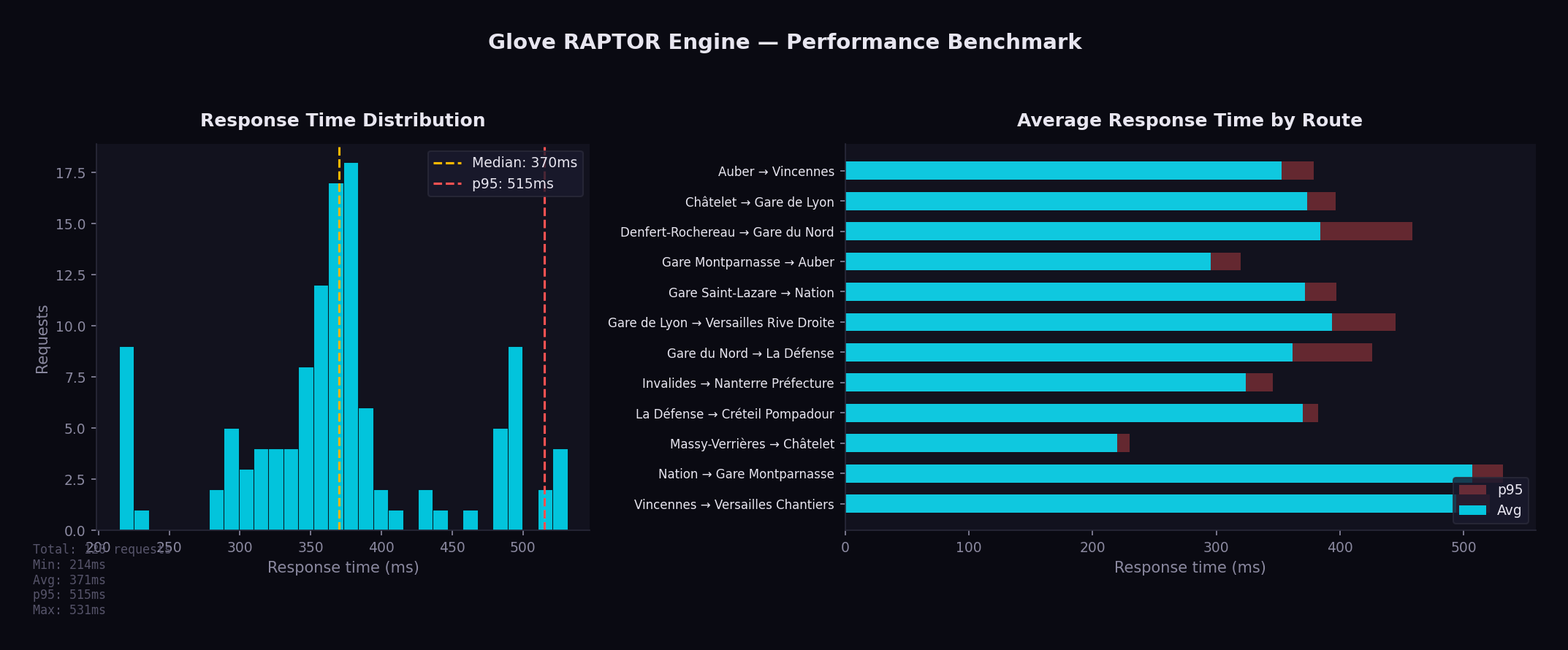
The RAPTOR engine holds all GTFS data in memory with optimized data structures, so the core round-based scan is fast (single-digit to low-tens of milliseconds). The end-to-end response time of GET /api/journeys/public_transport is higher because each request also runs the iterative diverse search (RAPTOR is re-run up to max_journeys times with pattern exclusion to produce varied alternatives) and enriches transfers via Valhalla (one walking-route call per transfer).
Benchmark across 12 origin/destination pairs covering Ile-de-France (10 rounds, single-threaded, weekday morning departure), with the default config.yaml (max_journeys: 5, prefer_rail: true):
| Metric | Value |
|---|---|
| Min | 270 ms |
| Avg | 1,425 ms |
| Median | 1,362 ms |
| p95 | 3,363 ms |
| Max | 4,281 ms |
These are end-to-end API times (iterative diverse search + Valhalla transfer enrichment), not the bare RAPTOR scan. The query is bounded by target + max-duration pruning (raptor_query_bounded): the scan stops relaxing stops that can no longer improve the journey to the destination within max_duration. This roughly halved suburban routes (e.g. Massy-Verrières → Châtelet). The remaining cost is dominated by the number of alternatives (max_journeys): central routes that return 5–7 distinct journeys re-run RAPTOR several times and are the slowest. Lowering max_journeys reduces response time further.
Running Benchmarks
python3 scripts/benchmark.py --rounds 10 --concurrency 1 --datetime 20260529T083000
The benchmark script:
- Sends requests to 12 representative origin/destination pairs (stop-to-stop)
- Measures response times across multiple rounds
- Prints a summary table and generates a chart (
--output, defaultdocs/benchmark.png)
Pick a --datetime that falls inside the loaded GTFS service window (otherwise no journeys are found). For high request rates, set server.rate_limit: 0 in config.yaml so the rate limiter does not reject the burst.
Key Optimizations
Binary Search in Trip Lookup
The find_earliest_trip function uses binary search (O(log n)) to find the first trip departing after a given time within a pattern, instead of linear scan.
Pre-Allocated Buffers
Label arrays and working buffers are allocated once and reused across RAPTOR rounds, eliminating per-round allocation overhead.
FxHashMap
Uses rustc-hash's FxHashMap throughout both GtfsData and RaptorData, replacing all standard library HashMap instances. FxHash is significantly faster than the default SipHash for integer and string keys.
Lock-Free Hot-Reload
ArcSwap provides atomic pointer swaps with zero contention. Readers never block, even during a reload. There is no mutex, no RwLock, and no read-side overhead.
Target + Max-Duration Pruning
raptor_query_bounded tracks an upper bound = min(departure + max_duration, best arrival at the destination) and refreshes it after each round. Relaxations (and the transfers/markings they trigger) beyond that bound are skipped, so the scan no longer expands the whole 54,000-stop network toward irrelevant or too-distant stops. This roughly halves long suburban queries while returning identical journeys.
Early Termination in Diversity Loop
The RAPTOR diversity loop (which re-runs the algorithm with pattern exclusion to find alternative journeys) terminates early when a round produces no new journeys, avoiding unnecessary iterations.
Arc<WalkLeg> Cache
Walking leg results from Valhalla are wrapped in Arc<WalkLeg> and cached, avoiding deep cloning of polyline coordinates when the same walk leg is referenced by multiple journeys.
Batch Valhalla Calls
Transfer enrichment requests to Valhalla are dispatched in parallel using futures::join_all, rather than sequentially, reducing latency for journeys with multiple transfers.
Pareto-Optimal Exploitation
All Pareto-optimal journeys from a single RAPTOR run are collected before the algorithm is re-run with pattern exclusion. This avoids redundant computation.
Cache Persistence
The RAPTOR index is serialized to disk with a fingerprint derived from the GTFS data. On restart, if the fingerprint matches, the cached index is loaded in sub-second time instead of rebuilding (10-30 seconds).
Pattern Grouping
Trips with identical stop sequences share a single pattern. For the Ile-de-France dataset this collapses ~391,000 trips into ~10,000 patterns, cutting the entities the algorithm scans by an order of magnitude.
Memory Usage
All GTFS data is held in memory. For the Ile-de-France dataset (as reported by GET /api/status and GET /api/metrics):
| Data | Approximate Size |
|---|---|
| Stops | ~53,700 entries |
| Routes | ~2,000 entries |
| Trips | ~391,000 entries |
| Stop times | ~8,370,000 entries |
| Transfers | ~202,000 entries |
| Patterns | ~10,000 groups |
| Resident memory (RSS) | ~265 MB |
| Virtual memory | ~480 MB |
Monitoring
Health Check
The simplest monitoring is the status endpoint:
curl http://localhost:8080/api/status
This is also used as the Docker healthcheck. A 200 OK response means the server is running and has GTFS data loaded.
Prometheus Metrics
Glove exposes metrics at GET /api/metrics in Prometheus text format. See the Metrics page for details.
Structured Logging
Glove uses the tracing crate for structured logging. Log level is configured in config.yaml:
server:
  log_level: "info"    # trace, debug, info, warn, error
Override at runtime with the RUST_LOG environment variable:
RUST_LOG=debug cargo run --release
Log Examples
INFO  glove::main > Starting Glove on 0.0.0.0:8080
INFO  glove::gtfs > Loaded 53705 stops, 390650 trips
INFO  glove::raptor > Built RAPTOR index in 12.3s
DEBUG glove::api::journeys > RAPTOR query: 2.3522;48.8566 → 2.2945;48.8584 in 342ms
Rate Limiting
Rate limiting is configured per IP address:
server:
  rate_limit: 20    # requests/sec, 0 = disabled
When the limit is exceeded, the server returns 429 Too Many Requests.
Graceful Shutdown
On SIGTERM or SIGINT, Glove:
- Stops accepting new connections
- Waits up to
shutdown_timeoutseconds for in-flight requests to complete - Exits cleanly
server:
  shutdown_timeout: 30    # seconds
Development Setup
Prerequisites
Quick Start
# Clone the repository
git clone https://github.com/ltoinel/Glove.git
cd Glove

# Download GTFS data
bin/download.sh gtfs

# Start in dev mode (auto-reload on file changes)
bin/start.sh --dev
Backend Development
cargo build                  # Debug build
cargo build --release        # Release build
cargo test                   # Run all tests
cargo clippy -- -D warnings  # Lint (must pass in CI)
cargo fmt --check            # Format check (must pass in CI)
cargo fmt                    # Auto-format
The dev mode uses cargo-watch to recompile automatically on file changes:
cargo install cargo-watch
cargo watch -x run
Frontend Development
cd portal
npm install                  # Install dependencies
npm run dev                  # Vite dev server on port 3000 with HMR
npm run build                # Production build to dist/
npx eslint src/              # Lint (must pass in CI)
CI Pipeline
GitHub Actions runs on every push to master and on pull requests:
- Backend: format check, clippy, build, test
- Coverage: cargo-tarpaulin with Codecov upload
- Frontend: ESLint + Vite build
All checks must pass before merging.
Useful Commands
# Run with debug logging
RUST_LOG=debug cargo run

# Run benchmarks
python3 bin/benchmark.py --rounds 10

# Start Valhalla for walk/bike/car routing
bin/valhalla.sh

# Check which GTFS transfer pairs have indoor routing data in Valhalla
python3 bin/check_indoor.py
The check_indoor.py script queries Valhalla for each GTFS transfer pair to determine which ones have indoor routing data available from OSM. This is useful for understanding indoor coverage in your deployment area.
Project Structure
Glove/
├── src/                         # Rust backend
│   ├── main.rs                  # Entry point, server setup, metrics middleware
│   ├── config.rs                # Nested YAML configuration
│   ├── gtfs.rs                  # GTFS data model & CSV loader
│   ├── raptor.rs                # RAPTOR algorithm & index building
│   ├── ban.rs                   # BAN address geocoding
│   ├── text.rs                  # Text normalization (diacritics)
│   └── api/
│       ├── mod.rs               # Shared response types
│       ├── journeys/
│       │   ├── mod.rs           # Journey module entry
│       │   ├── public_transport.rs  # RAPTOR journey planning
│       │   ├── walk.rs          # Walking via Valhalla
│       │   ├── bike.rs          # Cycling (3 profiles) via Valhalla
│       │   ├── car.rs           # Driving via Valhalla
│       │   └── valhalla.rs      # Shared Valhalla HTTP client
│       ├── places.rs            # Autocomplete (stops + addresses)
│       ├── gtfs.rs              # GTFS validation & reload endpoints
│       ├── tiles.rs             # Map tile proxy with disk cache
│       ├── metrics.rs           # Prometheus metrics endpoint
│       └── status.rs            # Status endpoint
│
├── portal/                      # React frontend
│   ├── src/
│   │   ├── App.jsx              # Main SPA (search, results, map, metrics)
│   │   ├── i18n.jsx             # Internationalization (FR/EN)
│   │   ├── main.jsx             # Entry point with MUI theme
│   │   ├── index.css            # Styling
│   │   ├── utils.js             # Pure utility functions (tested with vitest)
│   │   └── test/                # Vitest test files
│   ├── package.json
│   ├── vite.config.js
│   └── eslint.config.js
│
├── bin/                         # Utility scripts
│   ├── start.sh                 # Start script (production & dev)
│   ├── download.sh              # Data download (GTFS, OSM, BAN)
│   └── valhalla.sh              # Valhalla Docker setup
│
├── scripts/                     # Analysis & benchmarking
│   ├── benchmark.py             # Performance benchmark with charts
│   └── check_indoor.py          # Check GTFS transfers for indoor routing data
│
├── docker/
│   └── Dockerfile               # Multi-stage build (Node + Rust + Debian)
│
├── book/                        # Documentation (mdBook)
│   ├── book.toml
│   └── src/
│       └── images/              # Documentation images (screenshots, benchmarks)
│
├── data/                        # Data files (not committed)
│   ├── gtfs/                    # GTFS transit schedules
│   ├── osm/                     # OpenStreetMap data
│   ├── raptor/                  # Serialized RAPTOR index cache
│   ├── ban/                     # French address data
│   ├── tiles/                   # Cached map tiles (auto-populated)
│   └── valhalla/                # Valhalla routing tiles
│
├── config.yaml                  # Application configuration
├── Cargo.toml                   # Rust dependencies
├── CLAUDE.md                    # AI assistant guidance
├── README.md                    # Project overview
├── LICENSE.md                   # MIT license
└── .github/workflows/ci.yml    # CI pipeline
Key Files
| File | Lines | Description |
|---|---|---|
src/raptor.rs | ~2,200 | RAPTOR algorithm, the core of the application |
portal/src/App.jsx | ~2,200 | Entire frontend SPA in one file |
src/api/journeys/public_transport.rs | ~1,450 | Journey planning endpoint and response formatting |
src/api/gtfs.rs | ~830 | GTFS validation (19 checks) & reload endpoint |
src/config.rs | ~750 | Configuration with defaults (server, routing, map, bike, wheelchair) |
src/ban.rs | ~630 | BAN address geocoding with number interpolation |
src/gtfs.rs | ~570 | GTFS CSV parsing and data model |
src/api/places.rs | ~340 | Fuzzy search with ranking |
src/api/metrics.rs | ~370 | Prometheus metrics collection |
src/api/tiles.rs | ~110 | Map tile proxy with disk cache |
GTFS Data Overview
Glove loads transit data in the GTFS format (General Transit Feed Specification), an open standard used worldwide by transit agencies to describe their schedules, stops, and routes. The data is published by Ile-de-France Mobilités (IDFM), the public transit authority for the Paris region.
What is GTFS?
GTFS is a collection of CSV files that together describe a complete transit network. Think of it as a structured way to answer: "What vehicles go where, at what time, and how do passengers connect between them?"
All GTFS data is loaded into memory at startup. There is no database — the entire transit network lives in RAM for maximum query speed. This is what makes Glove fast: a journey query scans in-memory data structures instead of hitting a disk.
Dataset at a Glance
| File | Records | What it contains |
|---|---|---|
| agencies | 61 | Transit operators (RATP, SNCF, local bus companies...) |
| routes | 2,011 | Transit lines — each bus line, metro line, or RER line is a route |
| stops | 53,705 | Physical locations where passengers board or alight |
| trips | 390,650 | Individual vehicle runs — one bus doing its morning route is one trip |
| stop_times | 8,367,732 | The schedule: what time each trip arrives/departs at each stop |
| transfers | 201,582 | Walking connections between nearby stops (for changing lines) |
| calendars | 744 | Service patterns: which days each schedule runs (weekdays, weekends...) |
| calendar_dates | 1,150 | Exceptions to the calendar (holidays, strikes, special events...) |
Understanding the scale
To put these numbers in perspective:
- 10.9 million stop times means the dataset contains nearly 11 million individual "a vehicle stops here at this time" records. This is the bulk of the data.
- 390,650 trips represent every individual vehicle departure across all lines, all day, all week. A single metro line might have hundreds of trips per day.
- 201,582 transfers define where passengers can walk between stops to change lines. For example, walking from a metro platform to a nearby bus stop.
Understanding GTFS Objects
Agencies
An agency is a transit operator. Ile-de-France has 61 agencies, from large operators like RATP (Paris metro, buses, tramways) to small local bus companies covering specific towns.
Routes
A route is a transit line as passengers know it — "Metro line 4", "Bus 72", or "RER A". Each route has:
- A short name displayed on vehicles and maps (e.g. "4", "72", "A")
- A type indicating the transport mode (metro, bus, rail, tramway...)
- A color for visual identification
Stops
A stop is a physical place where passengers board or leave a vehicle. GTFS has three levels:
- Stop points (35,806) — the actual boarding location, like a specific platform or bus bay. "RER A, platform 1, Gare de Lyon" is a stop point.
- Stations (15,381) — a group of stop points. "Gare de Lyon" is a station that contains stop points for RER A, RER D, metro 1, metro 14, and several bus lines.
- Entrances (2,518) — physical entry/exit points to a station, like a specific stairway or elevator from street level.
Trips
A trip is one vehicle making one run along a route. For example, "the metro line 4 departing Porte de Clignancourt at 08:15" is a trip. The same route has hundreds of trips per day, one for each departure.
Stop Times
A stop time is the scheduled arrival and departure of a trip at a specific stop. It's the core of the timetable: "trip T123 arrives at Châtelet at 08:22 and departs at 08:23". With nearly 11 million of these, the dataset covers every scheduled stop of every vehicle.
Transfers
A transfer defines a walking connection between two stops, with a minimum transfer time in seconds. This tells the routing algorithm: "a passenger can walk from stop A to stop B in 120 seconds to change lines." Without transfers, the algorithm wouldn't know that two stops are close enough to walk between.
Calendars & Calendar Dates
Calendars define weekly patterns: "this schedule runs Monday to Friday" or "weekends and holidays only." Calendar dates are exceptions: "this schedule does NOT run on December 25" or "this special schedule runs on July 14." Together, they let Glove know which trips are active on any given date.
Routes by Transport Mode
| Mode | GTFS Type | Routes | Description |
|---|---|---|---|
| Bus | 3 | 1,952 | Urban and suburban bus lines |
| Rail | 2 | 24 | RER, Transilien, and TER regional trains |
| Tramway | 0 | 17 | Tramway lines and automated shuttles |
| Métro | 1 | 16 | Paris underground metro |
| Funiculaire | 7 | 1 | Montmartre funicular |
| Navette | 6 | 1 | Automated shuttle |
Bus routes represent 97% of all routes by count, but metro and RER carry the majority of daily passengers. Glove routes across all modes.
Métro Lines
16 metro lines operated by RATP, forming the backbone of urban transit in Paris:
| Line | Line | Line | Line | |||
|---|---|---|---|---|---|---|
| 1 | 5 | 9 | 13 | |||
| 2 | 6 | 10 | 14 | |||
| 3 | 7 | 11 | 3B | |||
| 4 | 8 | 12 | 7B |
Lines 3B and 7B are short branch lines. Line 14 is fully automated and the newest, recently extended to Orly airport.
RER Lines
5 RER (Réseau Express Régional) lines cross Paris and connect the city center to the suburbs and airports:
| Line | Terminals |
|---|---|
| A | Saint-Germain / Cergy / Poissy — Marne-la-Vallée / Boissy |
| B | CDG Airport / Mitry — Robinson / Saint-Rémy |
| C | Versailles / Saint-Quentin — Dourdan / Saint-Martin-d'Étampes |
| D | Orry-la-Ville / Creil — Melun / Malesherbes / Corbeil |
| E | Haussmann — Chelles / Tournan / Mantes (via Nanterre) |
RER lines are heavier, faster, and cover longer distances than the metro. They are the primary way to reach airports (CDG via RER B, Orly via RER C) and major suburban hubs.
Transilien Lines
9 suburban rail lines operated by SNCF, serving the outer suburbs:
| Line | Line | Line | ||
|---|---|---|---|---|
| H | L | R | ||
| J | N | U | ||
| K | P | V |
Transilien lines depart from the major Paris train stations (Saint-Lazare, Gare du Nord, Gare de Lyon, Montparnasse, Gare de l'Est) and serve towns beyond the reach of metro and RER.
TER Lines
Regional trains (Train Express Régional) from neighboring regions that serve stations within Ile-de-France:
- TER Bourgogne - Franche-Comté
- TER Centre - Val de Loire
- TER Hauts-de-France
- TER Normandie
- TER Grand-Est
These are operated by SNCF for the respective regions and provide connections to cities outside Ile-de-France.
Tramway Lines
17 tramway and automated lines, mostly running in the inner suburbs:
| Line | Line | Line | ||
|---|---|---|---|---|
| T1 | T6 | T11 | ||
| T2 | T7 | T12 | ||
| T3a | T8 | T13 | ||
| T3b | T9 | T14 | ||
| T4 | T10 | CDG VAL | ||
| T5 | ORLYVAL |
T3a and T3b form a ring around Paris along the boulevards des Maréchaux. CDG VAL and ORLYVAL are automated airport shuttles.
Stops Hierarchy
GTFS organizes stops in a three-level hierarchy:
| Level | Count | What it represents |
|---|---|---|
| Stop points | 35,806 | The exact spot where you board — a platform, a bus bay, a specific door |
| Stations | 15,381 | A named place grouping multiple stop points — "Gare du Nord" contains platforms for metro 4, metro 5, RER B, RER D, RER E, Transilien H, and bus stops |
| Entrances | 2,518 | Physical ways into a station — a stairway, an elevator, a specific street-level door |
This hierarchy is important for routing: when you search for "Gare du Nord", Glove finds the station and then considers all its stop points to find the best boarding platform for your journey.
Top 15 Transit Operators
| Operator | Routes | Coverage |
|---|---|---|
| RATP | 246 | Metro, RER A/B, tramways, Paris buses |
| Centre et Sud Yvelines | 109 | Bus network in southern Yvelines |
| Poissy - Les Mureaux | 88 | Bus network in northern Yvelines |
| Coeur d'Essonne | 66 | Bus network in central Essonne |
| Mantois | 64 | Bus network around Mantes-la-Jolie |
| Brie et 2 Morin | 64 | Bus network in eastern Seine-et-Marne |
| Roissy Ouest | 63 | Bus network near CDG airport |
| Meaux et Ourcq | 55 | Bus network around Meaux |
| Pays Briard | 55 | Bus network in southern Seine-et-Marne |
| Paris Saclay | 53 | Bus network around the Saclay plateau |
| Argenteuil - Boucles de Seine | 53 | Bus network in northern Hauts-de-Seine |
| Saint-Quentin-en-Yvelines | 51 | Bus network around SQY |
| Provinois - Brie et Seine | 48 | Bus network in far eastern Seine-et-Marne |
| Fontainebleau - Moret | 47 | Bus network around Fontainebleau |
| Essonne Sud Ouest | 47 | Bus network in southwestern Essonne |
RATP is by far the largest operator, running all metro lines, RER A and B, most tramway lines, and a massive bus network covering Paris and the near suburbs. The remaining 60 operators are organized by geographic zone and operate bus-only networks.
Data Source
The GTFS dataset is downloaded from:
https://data.iledefrance-mobilites.fr/explore/dataset/offre-horaires-tc-gtfs-idfm/
It is updated regularly by IDFM (typically every few weeks when schedules change). Glove can hot-reload the data via POST /api/gtfs/reload without service interruption — the new RAPTOR index is built in a background thread and swapped in atomically.
Routing Statistics
This page presents routing statistics for the IDFM GTFS dataset processed by Glove.
RAPTOR Index
After loading and pre-processing the GTFS data, Glove builds a RAPTOR index with the following characteristics:
| Metric | Value |
|---|---|
| Stops indexed | 53,705 |
| Trips loaded | 390,650 |
| Stop times | 8,367,732 |
| Patterns (grouped trips) | ~10,000 |
| Transfer pairs | 201,582 |
| Index build time | 10-30 seconds |
| RAM usage (resident) | ~265 MB |
Trips with identical stop sequences are grouped into patterns. For the IDFM dataset, ~391,000 trips are reduced to ~10,000 patterns — a ~39x reduction that directly speeds up the RAPTOR scan phase.
Query Performance
Benchmark across 12 representative origin/destination pairs covering Ile-de-France (10 rounds, single-threaded):

| Metric | Value |
|---|---|
| Min | 215 ms |
| Average | 371 ms |
| Median | 370 ms |
| p95 | 515 ms |
| Max | 531 ms |
Run the benchmark:
python3 bin/benchmark.py --rounds 10 --concurrency 1
Indoor Routing Coverage
Valhalla pedestrian routing enriches transfer sections with indoor maneuvers when OSM data is available.
| Metric | Value |
|---|---|
| Transfer pairs analyzed | 71,479 |
| With indoor data | 3,729 (5.2%) |
| Outdoor only | 67,745 (94.8%) |
| Stations with indoor data | 355 / 9,047 (3.9%) |
Indoor Maneuvers Found
| Type | Count |
|---|---|
| Escalator | 3,060 |
| Stairs | 1,441 |
| Elevator | 1,296 |
| Enter building | 34 |
| Exit building | 26 |
Top 10 Stations by Indoor Score
| Station | Score | Indoor Ratio |
|---|---|---|
| Gare Saint-Lazare | 1,344 | 53% |
| La Défense | 1,089 | 57% |
| Gare du Nord | 646 | 52% |
| Massy - Palaiseau | 633 | 87% |
| Gare Montparnasse | 527 | 27% |
| Versailles Chantiers | 478 | 77% |
| Opéra | 384 | 34% |
| République | 332 | 32% |
| Juvisy | 304 | 74% |
| Gare de l'Est | 260 | 32% |
For the full analysis, see Indoor Routing Coverage.
Valhalla Routing Modes
In addition to public transit (RAPTOR), Glove provides walk/bike/car routing via Valhalla with OSM data for Ile-de-France.
| Mode | Costing | Key Options |
|---|---|---|
| Walk | pedestrian | step_penalty: 30, elevator_penalty: 60 |
| City bike | bicycle | 16 km/h, avoid hills and roads |
| E-bike | bicycle | 21 km/h, hills easy with motor |
| Road bike | bicycle | 25 km/h, prefer smooth tarmac |
| Car | auto | Default Valhalla settings |
Bike Profiles
Three bike profiles are configured for the Ile-de-France context:
| Profile | Speed | Use Case | Hills | Roads |
|---|---|---|---|---|
| City (Vélib') | 16 km/h | Dense urban areas | Avoid (0.3) | Avoid (0.2) |
| E-bike (VAE) | 21 km/h | Commuting | Easy (0.8) | Accept (0.4) |
| Road | 25 km/h | Fast commuters | Moderate (0.5) | Prefer (0.6) |
Coverage Area
The default configuration covers the 8 departments of Ile-de-France:
| Department | Code |
|---|---|
| Paris | 75 |
| Seine-et-Marne | 77 |
| Yvelines | 78 |
| Essonne | 91 |
| Hauts-de-Seine | 92 |
| Seine-Saint-Denis | 93 |
| Val-de-Marne | 94 |
| Val-d'Oise | 95 |
Map bounds: SW (48.1, 1.4) to NE (49.3, 3.6), centered on Paris (48.8566, 2.3522).
Indoor Routing Coverage
This report analyses the availability of indoor pedestrian routing data in Valhalla tiles for GTFS transfer pairs in Ile-de-France. Indoor maneuvers (elevators, stairs, escalators, building entrances/exits) enable accurate turn-by-turn instructions for station transfers.
The bin/check_indoor.py script queries Valhalla's pedestrian route API for each unique GTFS transfer pair and checks whether the response contains indoor maneuver types (39-43). See Development Setup for usage.
Summary
| Metric | Value |
|---|---|
| Total transfer pairs checked | 71,479 |
| With indoor routing data | 3,729 (5.2%) |
| Outdoor only | 67,745 (94.8%) |
| Routing errors | 5 |
| Stations with indoor data | 355 / 9,047 (3.9%) |
Indoor Maneuver Types
| Type | Count | Description |
|---|---|---|
| Escalator | 3,060 | Escalator transitions between levels |
| Stairs | 1,441 | Staircase transitions |
| Elevator | 1,296 | Elevator/lift transitions |
| Enter building | 34 | Entering a station building |
| Exit building | 26 | Exiting a station building |
Escalators are the most commonly mapped indoor element, followed by stairs and elevators. Building entrance/exit transitions are rare, found mainly at CDG airport terminals.
Top 25 Stations by Indoor Coverage
Stations ranked by indoor score (total count of indoor maneuvers across all transfer pairs involving the station).
| Station | Score | Ratio | Elevators | Stairs | Escalators |
|---|---|---|---|---|---|
| Gare Saint-Lazare | 1,344 | 53% | 85 | 324 | 935 |
| La Défense | 1,089 | 57% | 47 | 0 | 1,042 |
| Gare du Nord | 646 | 52% | 8 | 313 | 325 |
| Massy - Palaiseau | 633 | 87% | 229 | 0 | 404 |
| Gare Montparnasse | 527 | 27% | 0 | 48 | 479 |
| Versailles Chantiers | 478 | 77% | 140 | 0 | 338 |
| Opera | 384 | 34% | 0 | 228 | 156 |
| Republique | 332 | 32% | 0 | 288 | 44 |
| Juvisy | 304 | 74% | 242 | 0 | 62 |
| Gare de l'Est | 260 | 32% | 8 | 88 | 164 |
| Saint-Quentin en Yvelines | 243 | 61% | 145 | 0 | 98 |
| Gare de Lyon | 226 | 25% | 10 | 65 | 151 |
| Europe | 210 | 32% | 0 | 134 | 76 |
| Corbeil-Essonnes | 206 | 58% | 8 | 198 | 0 |
| Bibliotheque Francois Mitterrand | 198 | 50% | 29 | 3 | 166 |
| Aeroport CDG Terminal 2 (TGV) | 180 | 68% | 36 | 0 | 66 |
| Fontainebleau - Avon | 164 | 74% | 137 | 27 | 0 |
| Aulnay-sous-Bois | 140 | 59% | 140 | 0 | 0 |
| Neuilly - Porte Maillot | 140 | 18% | 0 | 32 | 108 |
| Magenta | 126 | 75% | 4 | 13 | 109 |
| Haussmann Saint-Lazare | 119 | 100% | 37 | 16 | 66 |
| Evry - Courcouronnes | 87 | 28% | 21 | 0 | 66 |
| Havre - Caumartin | 81 | 10% | 16 | 21 | 44 |
| Bondy | 75 | 59% | 8 | 67 | 0 |
| Rosny-sous-Bois | 64 | 31% | 0 | 64 | 0 |
Key Observations
Well-covered stations
The major railway hubs have the best indoor coverage:
- Gare Saint-Lazare has the highest indoor score (1,344) with a good mix of escalators, stairs, and elevators. Over half of its transfer pairs include indoor maneuvers.
- La Defense scores second (1,089), dominated by escalators — consistent with its large underground hub connecting RER, metro, and tramway.
- Gare du Nord and Gare Montparnasse are well mapped, with escalators and stairs.
- Haussmann Saint-Lazare achieves a 100% indoor ratio — all its transfer pairs return indoor maneuvers.
RER/Transilien stations
Several suburban stations have high indoor ratios thanks to elevator mappings:
- Massy-Palaiseau (87%), Versailles Chantiers (77%), Juvisy (74%), Fontainebleau-Avon (74%) — these stations likely have well-mapped accessibility elevators in OSM.
- Aulnay-sous-Bois has 140 elevator maneuvers, suggesting comprehensive accessibility mapping.
Metro stations
Metro stations have lower coverage. Opera (34%), Republique (32%), and Europe (32%) appear in the top 25 but with moderate ratios. Most metro stations have no indoor data — the corridors and stairs connecting platforms are not yet mapped in OSM.
Gaps
- 94.8% of transfer pairs have no indoor routing data
- Only 3.9% of stations (355/9,047) have any indoor coverage
- Building enter/exit maneuvers are almost exclusively at CDG airport
- Most central Paris metro interchange stations (Chatelet, Nation, Strasbourg Saint-Denis...) are missing from the indoor data
How Glove Uses This Data
Glove only displays transfer maneuvers when Valhalla returns indoor routing data. For the 94.8% of transfers without indoor data, the transfer section shows only the duration and stop names — no potentially misleading outdoor walking route is displayed.
This ensures that:
- Users at Gare Saint-Lazare see: "Take the escalator to Level 2"
- Users at Chatelet see only: "Transfer 3 min" (no false outdoor route)
Improving Coverage
Indoor coverage depends on OSM contributors mapping station interiors. Key tags to add:
| OSM Tag | Description |
|---|---|
highway=footway | Indoor walkways/corridors |
highway=steps | Staircases between levels |
highway=elevator | Elevators/lifts |
indoor=yes | Marks a way as indoor |
level=* | Floor level (-1, 0, 1, ...) |
railway=subway_entrance | Metro station entrance nodes |
Tools for editing indoor data:
- OpenLevelUp — visualize existing indoor data by level
- JOSM with IndoorHelper plugin — edit indoor features
- Overpass Turbo — query indoor tags around a station
After updating Valhalla tiles with new OSM data, regenerate the CSV files:
python3 bin/check_indoor.py --output data/indoor_report.csv --summary data/indoor_summary.csv
Pathway Time Gaps
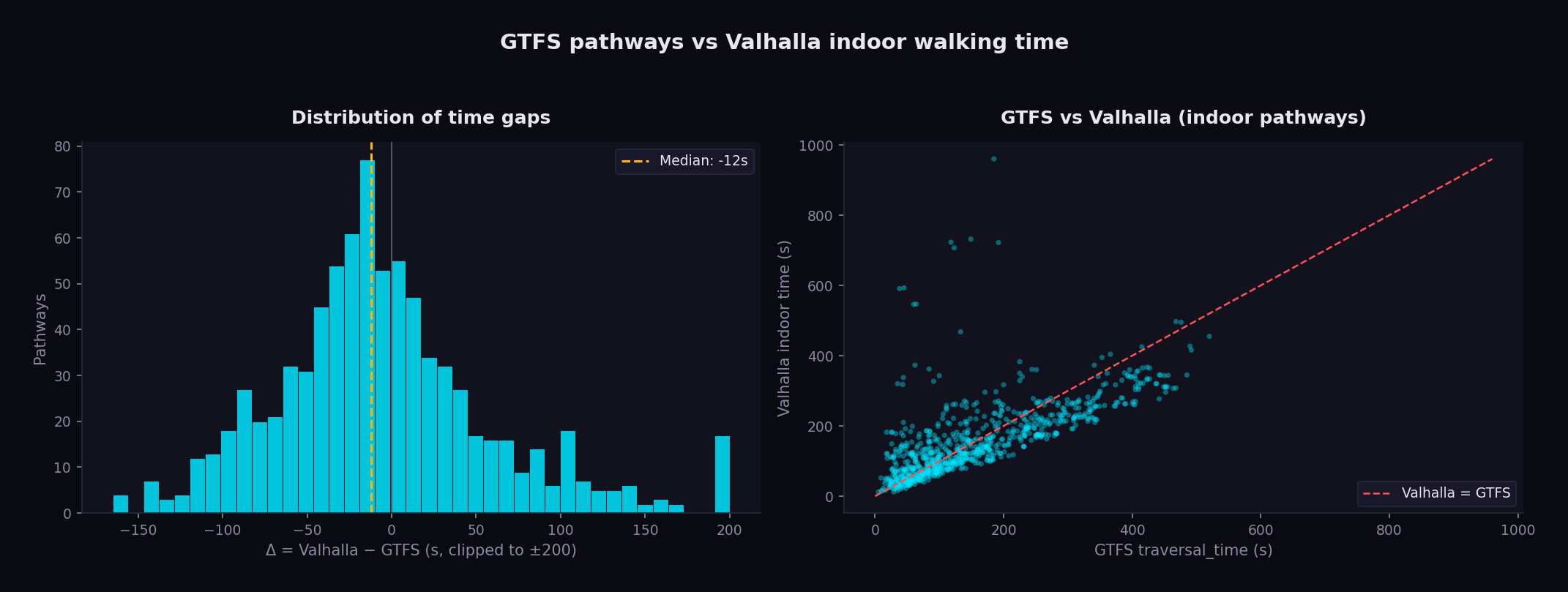
This page ranks the largest discrepancies between the GTFS pathways.txt traversal_time and the indoor walking time computed by Valhalla for the same two station nodes.
For every pathway with a traversal_time, Valhalla is asked for a pedestrian
route between the two nodes using Glove's indoor-friendly costing
(step_penalty: 0, elevator_penalty: 0, use_tunnels: 1.0). A pathway is kept
here only when Valhalla's route actually uses indoor infrastructure — i.e. it
contains an elevator / stairs / escalator / building enter-exit maneuver. Δ is
Valhalla − GTFS: a positive value means Valhalla is slower than the GTFS
declared time.
Generated by scripts/pathway_valhalla_diff.py + scripts/gen_pathway_gaps_page.py.
Summary
| Metric | Value |
|---|---|
| Pathways with indoor data | 820 |
| Median Δ (Valhalla − GTFS) | -12 s |
| Mean |Δ| | 55 s |
| |Δ| ≤ 15 s (good agreement) | 193 (24%) |
| |Δ| > 30 s | 470 (57%) |
| |Δ| > 60 s | 260 (32%) |
| |Δ| > 120 s | 58 (7%) |
Worst stations (≥ 3 indoor pathways)
Stations ranked by mean absolute gap — the highest rows are the stations whose indoor modelling diverges most from GTFS.
| # | Station | Pathways | Median Δ | Mean |Δ| | Worst Δ |
|---|---|---|---|---|---|
| 1 | Aéroport d’Orly (Terminaux 1-2-3) | 14 | +315 s | 331 s | +775 s |
| 2 | Nanterre Université | 3 | +97 s | 213 s | +530 s |
| 3 | Vernouillet - Verneuil | 4 | -18 s | 178 s | +584 s |
| 4 | Place des Fêtes | 3 | +156 s | 133 s | +156 s |
| 5 | Gare du Nord | 70 | -99 s | 97 s | +278 s |
| 6 | Porte de Clichy | 4 | -93 s | 92 s | -95 s |
| 7 | Gare de l'Est | 12 | +83 s | 85 s | +166 s |
| 8 | Avenue Foch | 3 | -52 s | 81 s | +125 s |
| 9 | Les Mureaux | 4 | +96 s | 78 s | +102 s |
| 10 | La Défense | 20 | +68 s | 76 s | +158 s |
| 11 | Bibliothèque François Mitterrand | 10 | +1 s | 67 s | +140 s |
| 12 | Haussmann Saint-Lazare | 10 | +18 s | 65 s | +135 s |
| 13 | Madeleine | 5 | -17 s | 63 s | +116 s |
| 14 | Magenta | 3 | -35 s | 63 s | +90 s |
| 15 | Poissy | 3 | -21 s | 62 s | +125 s |
| 16 | Opéra | 16 | +51 s | 61 s | +132 s |
| 17 | Gare Saint-Lazare | 98 | -36 s | 58 s | +311 s |
| 18 | Gare Montparnasse | 24 | -49 s | 57 s | +294 s |
| 19 | Lagny - Thorigny | 6 | -44 s | 52 s | -97 s |
| 20 | Rueil-Malmaison | 5 | -58 s | 52 s | -104 s |
| 21 | Gare de Lyon | 58 | -41 s | 51 s | -165 s |
| 22 | Gare d'Austerlitz | 4 | -52 s | 50 s | -78 s |
| 23 | Avenue Henri Martin | 3 | -44 s | 49 s | -65 s |
| 24 | Choisy-le-Roi | 4 | -48 s | 46 s | -62 s |
| 25 | Versailles Chantiers | 13 | -44 s | 45 s | -66 s |
| 26 | Montreuil - Hôpital | 6 | +44 s | 41 s | +51 s |
| 27 | Richelieu - Drouot | 15 | -3 s | 39 s | +104 s |
| 28 | Fontainebleau - Avon | 8 | -2 s | 39 s | +101 s |
| 29 | Pantin | 4 | +15 s | 39 s | +89 s |
| 30 | Rosny-sous-Bois | 10 | -42 s | 39 s | -62 s |
Top 50 individual gaps (descending)
Sorted by absolute gap. GTFS dist is the declared pathway length; Valh dist is the distance Valhalla actually walked — a much larger Valh dist reveals an indoor detour (incomplete OSM connectivity), while a large negative Δ suggests an over-cautious GTFS traversal_time.
| # | From → To | GTFS dist | Valh dist | GTFS | Valhalla | Δ |
|---|---|---|---|---|---|---|
| 1 | Entrée / Sortie → Orly 1-2-3 | 146 m | 1356 m | 185 s | 960 s | +775 s |
| 2 | Parking P3 / VTC - Taxis réservés 3 - Ride app Pick-up → Aéroport d'Orly | 93 m | 1039 m | 118 s | 723 s | +605 s |
| 3 | av. du Chemin de Fer → Vernouillet - Verneuil | 97 m | 932 m | 123 s | 707 s | +584 s |
| 4 | Bus → Aéroport d'Orly | 117 m | 1050 m | 149 s | 732 s | +583 s |
| 5 | Orly 1-2-3 → Aéroport d'Orly | 31 m | 855 m | 38 s | 591 s | +553 s |
| 6 | Orly 1-2-3 → Aéroport d'Orly | 36 m | 857 m | 45 s | 593 s | +548 s |
| 7 | bd des Provinces Françaises → Nanterre Université | 151 m | 1015 m | 192 s | 722 s | +530 s |
| 8 | Orly 4 - T7 - Cœur d'Orly → Aéroport d'Orly | 48 m | 785 m | 60 s | 546 s | +486 s |
| 9 | Orly 4 - T7 - Cœur d'Orly → Aéroport d'Orly | 51 m | 786 m | 64 s | 547 s | +483 s |
| 10 | Parking (Nord) → Conflans Fin d'Oise | 105 m | 603 m | 133 s | 468 s | +335 s |
| 11 | cour de Rome → Saint-Lazare | 49 m | 504 m | 62 s | 373 s | +311 s |
| 12 | r. du Cotentin (Gare Vaugirard) → Gare Montparnasse | 35 m | 392 m | 44 s | 338 s | +294 s |
| 13 | av. de la Gare → Robinson | 28 m | 428 m | 35 s | 320 s | +285 s |
| 14 | r. de Maubeuge → Paris Gare du Nord | 67 m | 489 m | 84 s | 362 s | +278 s |
| 15 | pl. Gabriel Péri → Saint-Lazare | 34 m | 454 m | 43 s | 318 s | +275 s |
| 16 | Galerie des Marchands → Saint-Lazare | 79 m | 466 m | 100 s | 343 s | +243 s |
| 17 | r. de l'Arcade → Saint-Lazare | 72 m | 464 m | 91 s | 327 s | +236 s |
| 18 | Terre-plein → Gare de l'Est | 35 m | 291 m | 44 s | 210 s | +166 s |
| 19 | bd Diderot → Paris Gare de Lyon | 348 m | 399 m | 442 s | 277 s | -165 s |
| 20 | Terre-plein → Gare de l'Est | 14 m | 251 m | 18 s | 182 s | +164 s |
| 21 | bd de Denain → Paris Gare du Nord | 368 m | 448 m | 468 s | 308 s | -160 s |
| 22 | Parvis - Esplanade → La Défense (Grande Arche) | 177 m | 447 m | 225 s | 383 s | +158 s |
| 23 | bd de Denain → Paris Gare du Nord | 365 m | 448 m | 464 s | 307 s | -157 s |
| 24 | bd Diderot → Gare de Lyon | 355 m | 415 m | 452 s | 296 s | -156 s |
| 25 | Place des Fêtes → pl.des Fêtes | 21 m | 212 m | 26 s | 182 s | +156 s |
| 26 | Place des Fêtes → pl.des Fêtes | 21 m | 212 m | 26 s | 182 s | +156 s |
| 27 | Parking P3 / VTC - Taxis réservés 3 - Ride app Pick-up → Aéroport d'Orly | 88 m | 370 m | 111 s | 258 s | +147 s |
| 28 | Terre-plein → Gare de l'Est | 25 m | 246 m | 32 s | 178 s | +146 s |
| 29 | Terre-plein → Gare de l'Est | 38 m | 261 m | 47 s | 192 s | +145 s |
| 30 | r. de Dunkerque → Paris Gare du Nord | 358 m | 453 m | 455 s | 311 s | -144 s |
| 31 | bd de Denain → Paris Gare du Nord | 318 m | 385 m | 404 s | 260 s | -144 s |
| 32 | r. de Dunkerque → Paris Gare du Nord | 355 m | 453 m | 452 s | 310 s | -142 s |
| 33 | Terre-plein → Gare de l'Est | 46 m | 269 m | 58 s | 199 s | +141 s |
| 34 | r. Goscinny → Bibliothèque François Mitterrand | 87 m | 338 m | 111 s | 251 s | +140 s |
| 35 | bd Vaugirard → Gare Montparnasse | 381 m | 424 m | 485 s | 345 s | -140 s |
| 36 | r. de Londres → Paris Saint-Lazare | 95 m | 371 m | 121 s | 261 s | +140 s |
| 37 | bd Diderot → Paris Gare de Lyon | 355 m | 416 m | 452 s | 312 s | -140 s |
| 38 | pl. de la Liberté → Bondy | 32 m | 254 m | 41 s | 180 s | +139 s |
| 39 | bd de Denain → Paris Gare du Nord | 315 m | 389 m | 401 s | 262 s | -139 s |
| 40 | bd Diderot → Paris Gare de Lyon | 353 m | 415 m | 449 s | 311 s | -138 s |
| 41 | r. de Londres → Paris Saint-Lazare | 98 m | 371 m | 125 s | 262 s | +137 s |
| 42 | r. Saint-Lazare → Haussmann Saint-Lazare | 88 m | 344 m | 111 s | 246 s | +135 s |
| 43 | Entrée / Sortie → Paris Gare du Nord | 318 m | 396 m | 405 s | 270 s | -135 s |
| 44 | Opéra → av. de l'Opéra | 110 m | 349 m | 139 s | 271 s | +132 s |
| 45 | Entrée / Sortie → Paris Gare du Nord | 315 m | 396 m | 401 s | 269 s | -132 s |
| 46 | bd de Denain → Paris Gare du Nord | 269 m | 311 m | 342 s | 210 s | -132 s |
| 47 | pl. du Petit Prince → Villepreux - Les Clayes | 44 m | 267 m | 55 s | 184 s | +129 s |
| 48 | Haussmann Saint-Lazare → r. Saint-Lazare | 84 m | 326 m | 106 s | 234 s | +128 s |
| 49 | Terre-plein → Gare de l'Est | 35 m | 235 m | 44 s | 172 s | +128 s |
| 50 | bd de Denain → Paris Gare du Nord | 272 m | 324 m | 345 s | 218 s | -127 s |